 TASKILL
If you really want to make your dreams come true
Link small routines with if-then rules. The compounding of habits opens up possibilities in your busy days.
Download on the App Store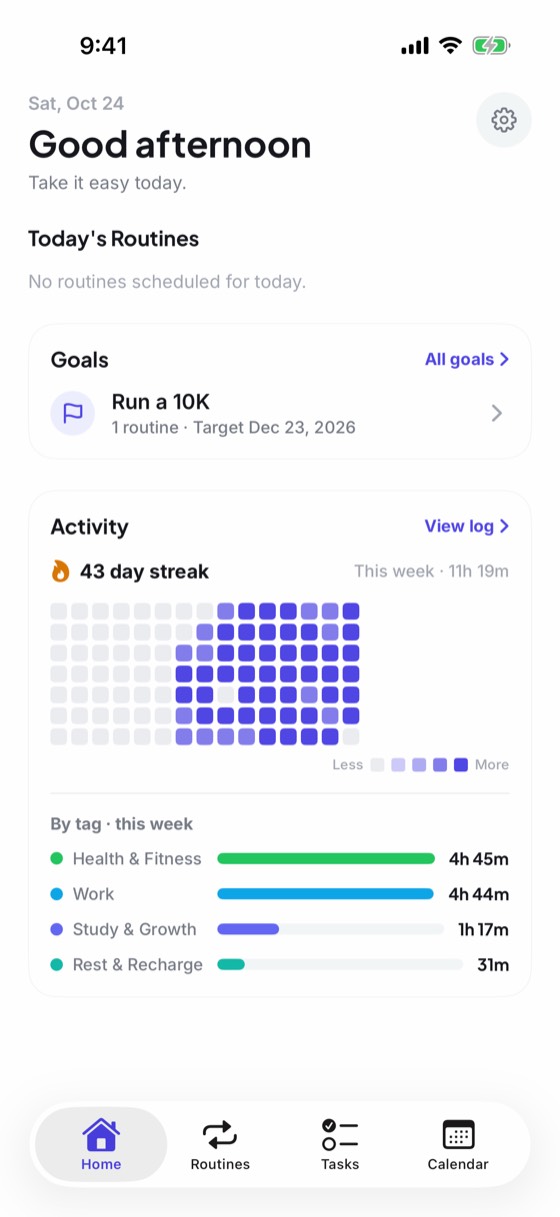
Why do small routines make dreams come true?
Big goals are rarely reached in one leap. They are reached by small routines you can really repeat, again and again, until the effort compounds like interest. TASKILL starts from the small routine, not the big plan.
What is an if-then rule?
An if-then rule is a plan in the form “When X happens, I do Y”: “When I wake up, I drink a glass of water.” “When it's 7:00, I start my morning routine.” Tying a new action to a cue you already have is a well-known idea from psychology research, sometimes called implementation intentions. If-then rules are what make small routines run on their own and compound. They are the foundation of TASKILL.
Do if-then rules actually work? What the research says
- A meta-analysis of 94 independent tests of if-then plans (implementation intentions) found a medium-to-large effect on goal attainment (d = 0.65).
Gollwitzer & Sheeran (2006). Implementation intentions and goal achievement: A meta-analysis of effects and processes. Advances in Experimental Social Psychology, 38, 69–119. doi:10.1016/S0065-2601(06)38002-1 - In a study where 96 people repeated one behaviour daily in the same context (such as "after breakfast"), the behaviour grew more automatic with repetition, and missing a single day did not materially affect habit formation. That is one reason TASKILL is not built around 100 percent.
Lally, van Jaarsveld, Potts & Wardle (2010). How are habits formed: Modelling habit formation in the real world. European Journal of Social Psychology, 40(6), 998–1009. doi:10.1002/ejsp.674
How do I build if-then rules in TASKILL?
Chain steps so each one cues the next
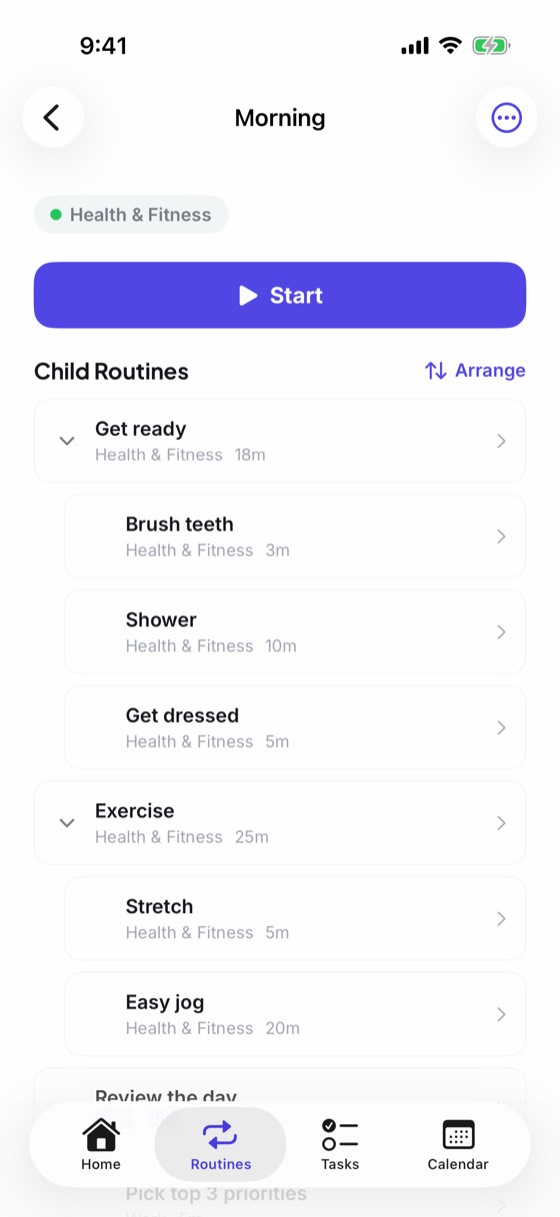
Put small routines in order under a routine such as “Morning”: wake up, drink water, stretch. When one step ends, the next one is already waiting, so each step becomes the cue for the next. TASKILL has no separate rule editor; the order of your routines is the rule.
Set a start time: if it's 7:00, start the routine
Give a routine repeat days and a start time. If notifications are on, TASKILL tells you when the time comes. It never starts on its own; you tap Start.
Combine small routines into bigger ones
Small routines can be grouped under a bigger one, up to five levels deep, and a routine can be shared under more than one parent and edited once. This is a supporting feature: the small routine stays the unit you repeat.
What happens on days that don't go to plan?
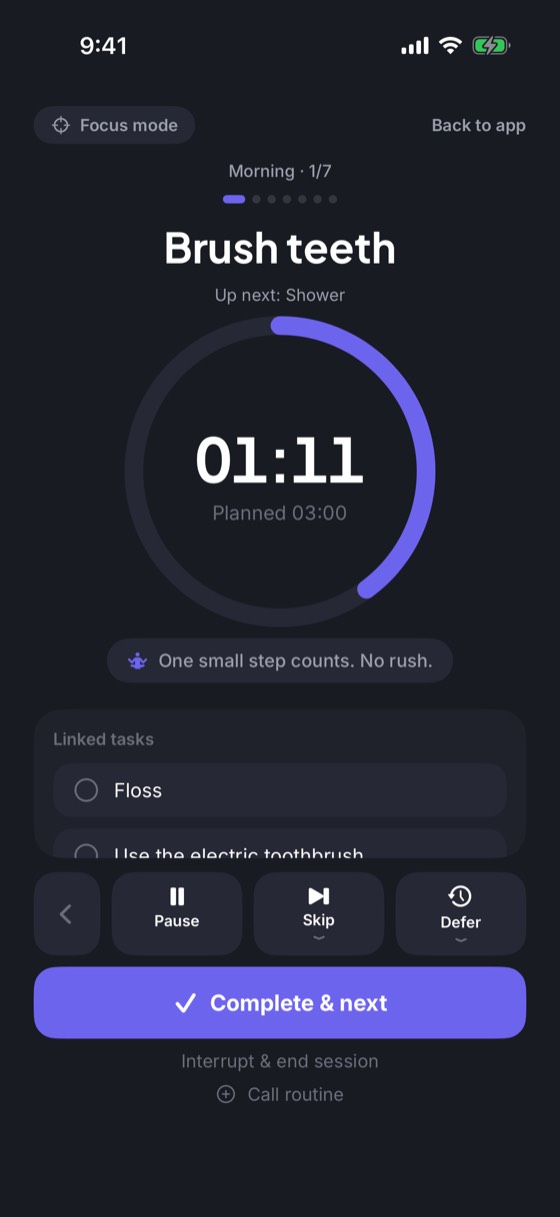
Your day changes, and your routines can change with it. While a routine runs, set a step aside for later, skip it for today, or call another routine when something comes up; when it ends, you return to where you were. Adjusting on the spot beats dropping the habit.
How do I stay focused while a routine is running?
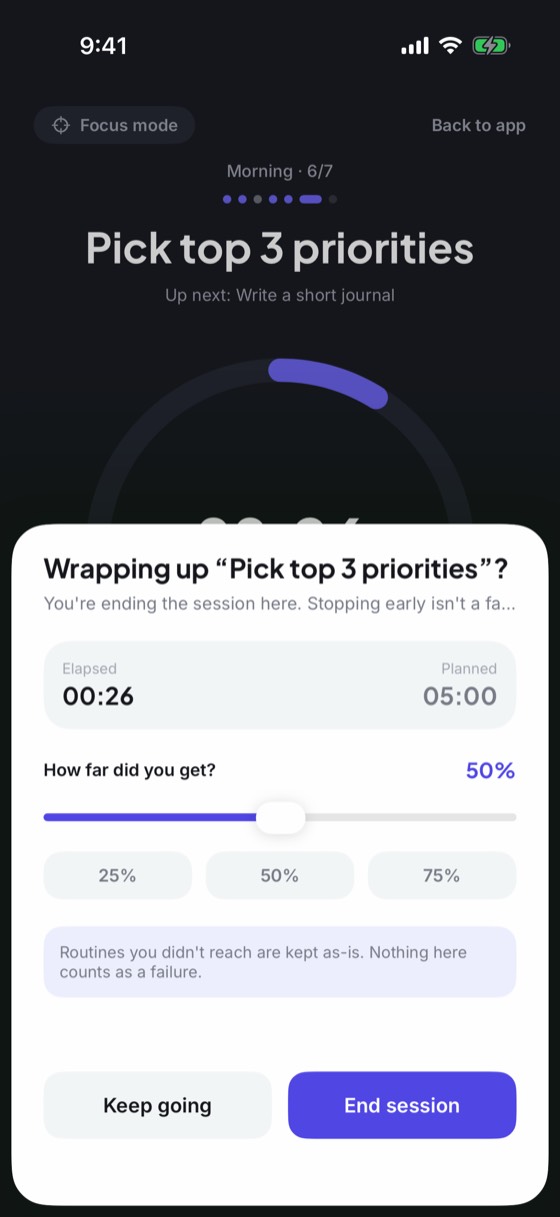
Start a routine and TASKILL takes over the screen. While it runs, the app keeps you on the current step instead of letting you wander into other screens. If you leave for another app, the session pauses and the time away is recorded honestly.
Can I keep going if I can't hit 100 percent every day?
Yes. TASKILL is not built on the assumption of 100 percent completion. Running over time does not end your session, and you say whether you finished, skipped, or stopped partway, and how far you got. TASKILL counts only quitting as failure, so adjusting your plan is always better than giving up.
How do I get started with TASKILL?
- Create a small routine, such as “Drink water”, and put it under a routine like “Morning”.
- Order the routines so each one leads to the next, and set repeat days and a start time.
- Tap Start. TASKILL keeps you on the current step; move forward, skip, or set a step aside.
- When you finish, say how far you got. Check your weekly time breakdown, heatmap and streak on the home screen.
What else is in the app?
Tasks you can link to routines and sort by urgency and importance. A weekly view of where your time goes. A calendar to spot an overloaded day. Optional notifications, a Live Activity on the Lock Screen and Dynamic Island, and Home Screen and Lock Screen widgets. No account and no sign-in: your data stays on your device, with backup export and import.
Frequently asked questions
Is TASKILL free?
Yes. TASKILL is free and shows ads. You can choose whether to allow ad personalization, and you can turn off usage analytics in Settings at any time.
Which devices does TASKILL support?
TASKILL is an iPhone app and requires iOS 26 or later.
Where is TASKILL available?
It is available on the App Store in the United States, Australia, New Zealand and Japan.
Do I need an account?
No. There is no account and no sign-in. Your routines, tasks and history are stored on your device.
Can I back up my data?
Yes. You can export a backup file whenever you like and import it later.
What is an if-then rule, and how does TASKILL use it?
An if-then rule is a plan in the form “When X happens, I do Y”, a well-known idea from psychology research. In TASKILL you chain small routines so that each one leads to the next, and you give a routine a start time so a notification tells you when to begin. There is no separate rule editor, and the app never starts a routine for you.
How is TASKILL different from other habit apps?
It builds on small routines linked by if-then rules, keeps you on the current step while a routine runs, lets you set a step aside, skip it or call another routine when your day changes, and does not assume you will hit 100 percent, so a bad day doesn't end the habit.
What language is the app in?
TASKILL is available in English and Japanese. It follows your iPhone's language setting.